Optimizing Your iPhone's MagSafe Ecosystem: Practical Accessory Choices for Everyday Use
MagSafe, since its reintroduction with the iPhone 12 series, has evolved beyond a mere charging standard into a robust ecosystem of accessories designed to seamlessly integrate with your iPhone. It’s not just about snapping on a charger; it’s about enhancing convenience, functionality, and even the aesthetic appeal of your device. For iPhone Arc readers seeking to make informed choices, understanding the breadth of MagSafe accessories and how they interact with your iPhone’s current design is paramount.
Editor's pick: MagSafe iPhone cases on Amazon → As an Amazon Associate, this site earns from qualifying purchases.
The Core of MagSafe: Design Integration
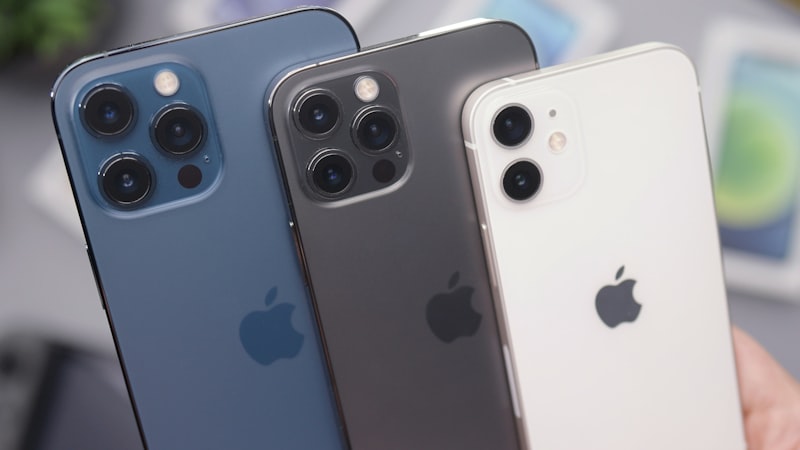
The strength of MagSafe lies in its precisely engineered ring of magnets embedded within the iPhone’s back panel. This design allows for a secure, aligned connection with compatible accessories, ensuring optimal performance whether charging or attaching a wallet. The flat-edged design of recent iPhone generations, from the iPhone 12 through to the latest models, further complements this magnetic attachment, providing a stable platform for accessories to cling to.
Consider how the camera bump, a prominent feature on Pro models, influences accessory design. While MagSafe's magnetic ring is centered, accessories like external batteries or multi-device charging stands are carefully designed to clear the camera module, ensuring a flush fit. When selecting an accessory, especially for a Pro or Pro Max model, a quick check of its compatibility with the specific camera housing dimensions is always a prudent step.
Diverse MagSafe Accessory Categories
Charging Solutions: Powering Your Day with Ease
MagSafe chargers offer unparalleled convenience, eliminating the need to precisely align a Lightning or USB-C cable. Apple’s official MagSafe Charger delivers up to 15W of wireless charging (for compatible iPhones), while a growing array of third-party options offer similar performance, often at varying price points or with additional features. Look for chargers that are MFi (Made For iPhone) certified to ensure optimal performance and safety.
- Charging Pads: Ideal for bedside tables or desks, providing a flat surface for your iPhone.
- Charging Stands: Elevate your iPhone, making it perfect for video calls or glanceable notifications while powering up. Many stands offer adjustable angles or the ability to charge multiple devices simultaneously.
- Portable Power Banks: Compact battery packs that magnetically attach to your iPhone, offering on-the-go power without extra cables. Their capacity and form factor are key considerations based on your daily power needs.
Wallets and Card Holders: Streamlined Essentials
The MagSafe Wallet has become a popular accessory for those looking to ditch bulkier traditional wallets. These slim cardholders securely attach to the back of your iPhone, providing quick access to essential cards. Third-party options expand on this concept, sometimes offering additional storage or unique materials.
When choosing a MagSafe wallet, consider its capacity – typically two to three cards – and the security of its magnetic attachment. Some designs also incorporate features like Find My integration for added peace of mind, allowing you to track your wallet if it detaches.
Mounts and Stands: Versatility for Every Scenario
MagSafe has revolutionized how iPhones can be mounted and positioned. From car dashboards to kitchen counters, the magnetic attachment offers quick, secure placement.
- Car Mounts: Providing a stable, hands-free solution for navigation and media playback while driving. Many integrate charging capabilities.
- Desk and Tripod Mounts: Essential for content creators, offering a quick way to attach your iPhone to a tripod or stand for stable video recording or photography. Some even allow for easy rotation between portrait and landscape orientations.
- Fitness Mounts: Attach your iPhone to gym equipment for easy access to workout apps or entertainment.
Selecting the Ideal MagSafe Accessory
Choosing the right MagSafe accessory involves balancing functionality with your personal aesthetic and lifestyle. Consider the following:
- Compatibility with Your iPhone Model: While MagSafe is universal across recent generations, slight variations in camera bump size (e.g., iPhone 15 Pro vs. iPhone 15 Pro Max) can influence the fit of some accessories, particularly those with larger footprints.
- Material and Finish: MagSafe accessories come in a variety of materials, from soft-touch silicone to premium leather and durable plastics. Select a material that complements your iPhone’s finish and any existing case, contributing to a cohesive look. As we’ve explored previously, the tactile experience of materials significantly impacts user satisfaction, and this extends to accessories.
- Intended Use: Are you primarily seeking charging convenience, a minimalist wallet solution, or a versatile mounting system? Prioritizing your primary need will guide your selection.
- Budget: Official Apple MagSafe accessories often command a premium, but a robust market of third-party options provides excellent alternatives across various price points.
Maintaining Your MagSafe Ecosystem
To ensure longevity and optimal performance, keep the magnetic surfaces of both your iPhone and accessories clean. Dust and debris can weaken the magnetic connection or scratch surfaces over time. For wallets and other daily-use items, occasional cleaning with a soft, damp cloth is advisable.
The MagSafe ecosystem continues to expand, offering an ever-growing array of ways to customize and enhance your iPhone experience. By understanding the design principles and the diverse range of available accessories, you can confidently build a MagSafe setup that perfectly suits your needs and elevates your daily interaction with your iPhone.